Find your next sailing - introducing Next Departures on Routescanner
For shippers and freight forwarders, knowing that a service exists between two ports is only half the answer. The harder question is which vessel is leaving next, when, and with whom. Next Departures closes that gap.
A typical container shipment doesn't start with a route - it starts with a date. Cargo is ready on Monday; the question is which sailing it can realistically make. Yet the answer usually involves stitching together carrier portals, weekly bulletins, and emails to local sales offices - each carrier in their own format, each schedule in its own time zone.
The information exists. It's just rarely been shown side by side, vessel by vessel. That's what Next Departures is for.
Why next departures matter
Connectivity tools - including our own Connectivity Comparison - tell you what's structurally possible: which trade lanes connect two ports, who operates them, and how often. That view is invaluable when you're designing a procurement strategy or evaluating coverage.
But once you're planning an actual shipment, the relevant questions shift:
- Which specific vessel is calling next week?
- Who is the vessel operator, and which sales offices can quote on it?
- What's the realistic transit time on this exact sailing, not the published lane average?
- What's the CO₂ footprint of this vessel - not the lane in general?
Those answers need vessel-level data, dated to the day.
What Next Departures shows
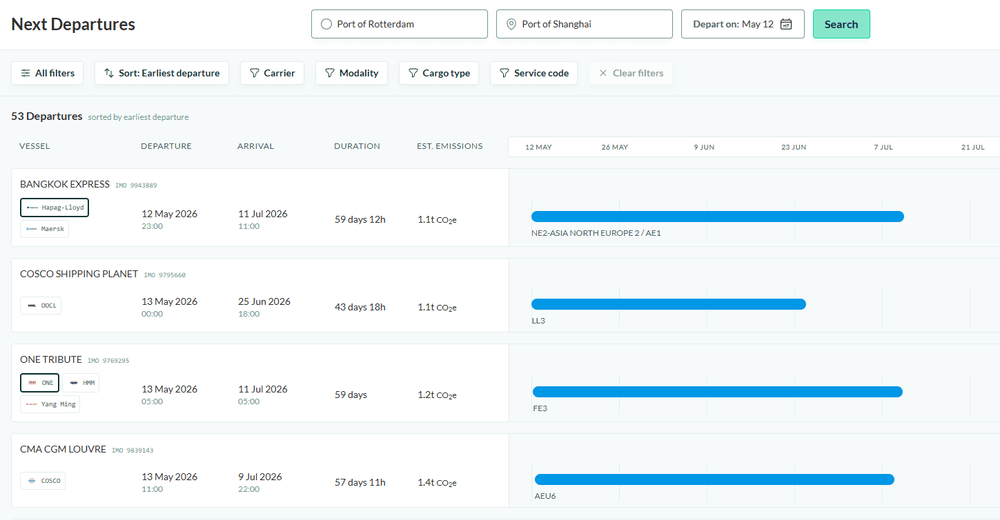
Next Departures takes three inputs - origin port, destination port, and a departure date within a three-month window - and returns the actual upcoming sailings between them.
Ocean sailings are the primary use case, but inland rail and barge departures are surfaced in the same view where available - useful when the relevant leg of your shipment isn't on the water.
Each result is a vessel call, not an abstract service. For every departure you see:
- Vessel name and IMO number - to cross-reference with your own systems or tracking tools.
- Operator(s) - with vessel operators visually distinguished from slot charterers, so it's clear who actually controls the asset.
- Exact departure and arrival times at origin and destination.
- Transit duration in days.
- Estimated CO₂ emissions for the sailing, in kg or tonnes.
- A visual timeline placing the journey in context.
Expanding a row reveals an operator-by-operator breakdown: each operator's service code, SCAC, modality tag (SEA, RAIL, BARGE, TRUCK), supported cargo type, and operator-specific departure/arrival times. Where two carriers are co-loading the same vessel under different service names, you see both - each with their own codes - instead of a single composite line that hides the detail you need to book.
How shippers and forwarders use it
A typical workflow:
1. Search. Enter origin, destination, and the earliest date your cargo is ready.
2. Filter. Narrow by carrier, modality, cargo type, or service code if you have a preferred routing or contract carrier.
3. Sort. By earliest departure if you're racing the clock, earliest arrival if a delivery date is fixed, or shortest lead time if transit speed matters most.
4. Expand. Open the foldout to confirm SCAC and service code per operator - the references you need to actually book the cargo and tag it internally.
5. Decide. Pick the sailing that matches the trade-off you care about: speed, emissions, or carrier preference.
What used to be half a day of inbox archaeology becomes a few minutes of side-by-side comparison.
Where it fits in the Routescanner toolset
Next Departures complements two tools you may already use:
- Connectivity Comparison answers "what's possible?" - the structural network of trade lanes and frequencies, with no specific date.
- Optimizer answers "what's optimal?" - the best multi-leg route across a flexible window, balancing lead time, price, and emissions.
- Next Departures answers "what's leaving?" - the concrete vessel sailings on a chosen date, ready to book against.
Strategic, tactical, operational. Different questions, different tools, the same underlying schedule and emissions data.
Try it
Next Departures is available in beta to Routescanner PRO accounts. Open Next Departures (beta) in the tool menu, or contact your account manager to get access enabled for your team.
We're actively shaping the feature with feedback from shippers and forwarders - if there's a column, filter, or sort option you'd like to see next, let us know.
More from the blog
(in Spanish) Routescanner.com: La plataforma intermodal de uso gratuito que no querrá compartir
Navigating the Future: Sustainable Logistics in Five Key Dimensions

How do we calculate CO2 emissions in Routescanner?
Stay in the loop
Discover how our network of shippers, forwarders, operators and terminals is growing.
Subscribe to our updates